Introduction
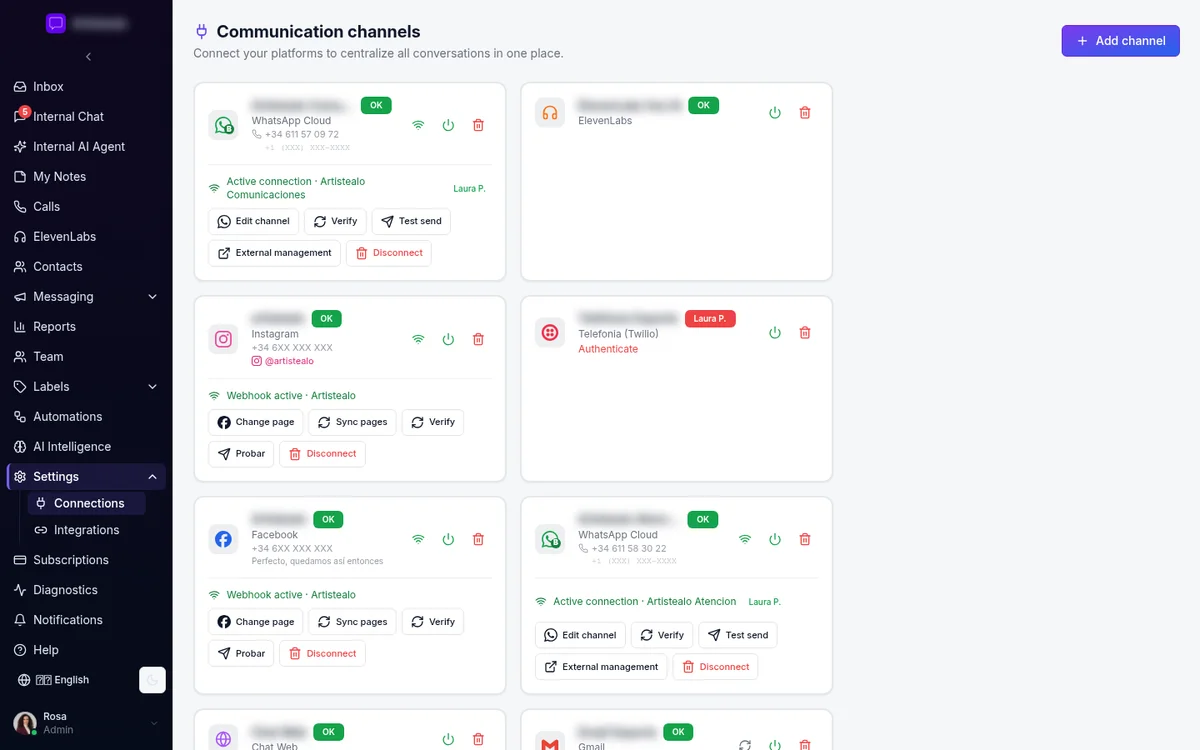
Integrating WhatsApp Business API with Chatconverse is crucial for businesses looking to streamline their customer communication. This guide will walk you through the steps needed to configure the API effectively within the Chatconverse platform. With this setup, you can manage customer interactions more efficiently, ensuring a cohesive communication strategy. By following this guide, you'll leverage the full potential of Chatconverse’s shared omnichannel inbox.
WhatsApp is a vital communication channel for many businesses, and integrating it with Chatconverse’s platform can significantly enhance your customer support capabilities. The process might seem daunting, but with our step-by-step instructions, you'll find it straightforward. This integration allows for seamless interaction with customers across various channels from a single interface. Ensuring that your team can access and respond to WhatsApp messages efficiently will improve response times and customer satisfaction.
The benefits of configuring WhatsApp Business API with Chatconverse extend beyond basic communication. It enables smart routing and automatic conversation assignment, ensuring that the right team members handle specific inquiries. Additionally, with AI chatbot and AI agents, you can automate responses, improving efficiency and freeing up your team for more complex tasks. This guide will provide you with all the necessary insights to make the most of these features.
To get started, ensure you have access to the necessary credentials for WhatsApp Business API. With these in hand, you can proceed with configuring your Chatconverse account to integrate seamlessly with WhatsApp. Following the steps outlined in this guide will help you set up the integration quickly and efficiently, allowing you to focus on providing exceptional customer support across all your channels.
Shared Omnichannel Inbox
The shared omnichannel inbox is a standout feature of Chatconverse, enabling businesses to manage multiple communication channels from a single interface. This feature is particularly beneficial when integrating WhatsApp Business API, as it allows for streamlined communication with customers. Through the shared inbox, team members can view and respond to messages from WhatsApp, Instagram Direct, Facebook Messenger, Email, and more, ensuring no message is missed.
With the shared omnichannel inbox, businesses can centralize their communication efforts, improving efficiency and response times. The integration of WhatsApp Business API ensures that all customer inquiries are directed to the appropriate team members. This feature also supports live web chat widgets and voice calls via Twilio, providing a comprehensive communication solution. By utilizing this feature, businesses can maintain a high level of customer service across all platforms.
The shared inbox feature is designed to enhance collaboration within teams, ensuring that everyone is on the same page. This is particularly important when dealing with high volumes of customer inquiries, as it helps prevent any potential overlap or missed messages. Additionally, the integration with WhatsApp Business API allows for more personalized interactions with customers, as team members have access to the full history of conversations across all channels. This ensures that responses are informed and relevant, improving the overall customer experience.
- Centralized communication across WhatsApp, Instagram, Facebook, Email, and more.
- Seamless integration of live web chat widgets and voice calls via Twilio.
- Improved team collaboration through a unified inbox interface.
- Personalized customer interactions with access to conversation history.
- Efficient handling of high volumes of inquiries with smart routing.
AI Chatbot and AI Agents
Chatconverse’s AI chatbot and AI agents offer powerful tools for automating customer interactions. These features are integral when configuring WhatsApp Business API, providing businesses with the ability to respond to inquiries quickly and efficiently. The no-code builder allows for easy setup and customization, enabling businesses to tailor the chatbot to their specific needs and preferences.
The AI chatbot can handle a wide range of customer inquiries, freeing up your team to focus on more complex issues. This automation not only improves response times but also enhances the overall customer experience. By integrating with WhatsApp Business API, the AI chatbot can interact with customers directly through the platform, ensuring prompt and accurate responses to their queries.
AI agents complement the chatbot by providing assistance with more complicated tasks. These agents are equipped with the ability to summarize conversations, ensuring that team members are informed and can provide effective follow-up. The combination of AI chatbot and AI agents within the Chatconverse platform offers a robust solution for businesses looking to improve their communication processes and customer satisfaction.
- No-code builder for easy AI chatbot customization.
- Automated responses to common inquiries, reducing response times.
- Integration with WhatsApp Business API for direct customer interaction.
- AI conversation summaries for informed follow-ups.
- Enhanced customer experience with a combination of chatbot and AI agents.
Smart Routing and Automatic Conversation Assignment
Smart routing and automatic conversation assignment are essential features within Chatconverse, especially when integrating with WhatsApp Business API. These features ensure that customer inquiries are directed to the most appropriate team members, improving efficiency and response times. By utilizing these tools, businesses can manage their communication channels more effectively, ensuring that customer needs are met promptly.
The smart routing feature uses predefined criteria to assign conversations to the right team members. This ensures that inquiries are handled by individuals with the appropriate expertise, enhancing the quality of customer support. Automatic conversation assignment further streamlines this process by distributing inquiries evenly among team members, preventing any one individual from becoming overwhelmed.
These features are particularly beneficial for businesses dealing with high volumes of customer inquiries. By ensuring that inquiries are directed to the right team members quickly, businesses can maintain a high level of customer satisfaction. The integration with WhatsApp Business API allows these features to be utilized across all communication channels, providing a seamless customer experience.
- Predefined criteria for assigning inquiries to appropriate team members.
- Even distribution of inquiries to prevent team member overload.
- Integration with WhatsApp Business API for streamlined communication.
- Improved response times and customer satisfaction.
- Efficient management of high volumes of customer inquiries.
Automation Rules and Workflows
Automation rules and workflows are powerful tools within the Chatconverse platform, enabling businesses to streamline their communication processes. These features are particularly beneficial when integrating WhatsApp Business API, as they allow for the automation of repetitive tasks and the efficient management of customer inquiries. By utilizing automation rules, businesses can improve efficiency and reduce response times, ultimately enhancing customer satisfaction.
Workflows within Chatconverse can be customized to meet the specific needs of a business, allowing for the automation of a wide range of tasks. This includes everything from the initial response to customer inquiries to the follow-up process. By automating these tasks, businesses can free up their team members to focus on more complex issues, improving overall productivity.
The integration with WhatsApp Business API allows these automation rules and workflows to be applied across all communication channels, ensuring a consistent and efficient customer experience. This level of automation is particularly beneficial for businesses dealing with large volumes of customer inquiries, as it allows for the efficient management of these interactions without sacrificing quality.
- Automation of repetitive tasks to improve efficiency.
- Customizable workflows to meet specific business needs.
- Integration with WhatsApp Business API for consistent communication.
- Improved productivity through task automation.
- Efficient management of large volumes of customer inquiries.
AI Conversation Summaries
AI conversation summaries are a valuable feature within Chatconverse, providing team members with a concise overview of customer interactions. This feature is particularly beneficial when integrating WhatsApp Business API, as it ensures that team members are informed and can provide effective follow-up. By utilizing AI conversation summaries, businesses can improve the quality of their customer support and enhance overall satisfaction.
These summaries are generated automatically by AI agents, providing a quick and accurate overview of each customer interaction. This allows team members to quickly familiarize themselves with the details of a conversation, ensuring that their responses are informed and relevant. The integration with WhatsApp Business API ensures that these summaries are available for all interactions across this platform.
AI conversation summaries are an essential tool for businesses looking to improve their communication processes. By ensuring that team members are informed, businesses can provide more personalized and effective support, ultimately enhancing the overall customer experience. This feature is particularly beneficial for businesses dealing with high volumes of inquiries, as it allows for efficient management of these interactions.
- Automatic generation of concise conversation summaries.
- Improved team member knowledge and response quality.
- Integration with WhatsApp Business API for comprehensive coverage.
- Enhanced customer experience through personalized support.
- Efficient management of high volumes of customer interactions.
Quick Replies and Message Templates
Quick replies and message templates are essential features within Chatconverse, enabling businesses to respond to customer inquiries quickly and efficiently. These features are particularly beneficial when integrating WhatsApp Business API, as they allow for the rapid handling of common inquiries. By utilizing quick replies and message templates, businesses can improve response times and enhance customer satisfaction.
Quick replies allow team members to respond to common inquiries with pre-defined messages, reducing the time spent on repetitive tasks. Message templates provide a consistent and professional response to customer inquiries, ensuring that all interactions are of a high quality. The integration with WhatsApp Business API ensures that these features can be utilized across all interactions on this platform.
These features are particularly beneficial for businesses dealing with high volumes of customer inquiries. By providing team members with the tools needed to respond quickly and efficiently, businesses can maintain a high level of customer satisfaction. Additionally, the use of quick replies and message templates ensures that all interactions are consistent and professional, enhancing the overall customer experience.
- Pre-defined messages for quick responses to common inquiries.
- Consistent and professional responses with message templates.
- Integration with WhatsApp Business API for seamless communication.
- Improved response times and customer satisfaction.
- Efficient handling of high volumes of customer inquiries.
Use Cases
Integrating WhatsApp Business API with Chatconverse provides a wide range of use cases for businesses looking to improve their communication processes. From customer support to marketing, the integration offers a comprehensive solution for managing interactions across multiple channels. By leveraging the features of Chatconverse, businesses can enhance their communication strategies and improve customer satisfaction.
One common use case is customer support, where businesses can utilize the shared omnichannel inbox to manage inquiries efficiently. This ensures that all customer interactions are handled promptly and professionally, improving overall satisfaction. Additionally, the use of AI chatbot and AI agents can automate responses to common inquiries, freeing up team members to focus on more complex issues.
Another use case is marketing, where businesses can use the integration to engage with customers directly through WhatsApp. By utilizing quick replies and message templates, businesses can maintain consistent and professional interactions, enhancing their brand image. Additionally, the use of automation rules and workflows allows for efficient management of marketing campaigns across multiple channels.
These use cases demonstrate the versatility of integrating WhatsApp Business API with Chatconverse. By leveraging the features of the platform, businesses can improve their communication processes and enhance overall customer satisfaction. Whether it's for customer support or marketing, the integration offers a comprehensive solution for managing interactions across multiple channels.
- Efficient customer support with the shared omnichannel inbox.
- Automated responses to common inquiries with AI chatbot.
- Direct customer engagement through WhatsApp for marketing.
- Consistent and professional interactions with message templates.
- Efficient management of marketing campaigns with automation rules.
Conclusion
Integrating WhatsApp Business API with Chatconverse is a powerful way to enhance your business’s communication processes. By following the steps outlined in this guide, you can configure the API effectively and leverage the full potential of Chatconverse’s features. From the shared omnichannel inbox to AI chatbots, the platform offers a comprehensive solution for managing customer interactions across multiple channels.
By utilizing the features of Chatconverse, businesses can improve efficiency and response times, ultimately enhancing customer satisfaction. The integration with WhatsApp Business API ensures that all interactions are handled promptly and professionally, providing a seamless customer experience. Whether it's for customer support or marketing, the platform offers a versatile solution for managing communication across multiple channels.
With the insights provided in this guide, you can confidently configure WhatsApp Business API with Chatconverse and start reaping the benefits of a streamlined communication process. By leveraging the features of the platform, you can enhance your business’s communication strategies and improve overall customer satisfaction.